Product guide
AI food scanner: scan any meal for calories with your camera
How to scan food for calories, when to use the barcode scanner instead, and the photography habits that make the difference between a useful estimate and a useless one.
Last reviewed August 30, 2026 by the Caloris nutrition product team.
How to scan a meal, step by step
Open the scanner and frame the plate
Launch Caloris and open the scanner. Get the whole meal in frame with a size reference nearby — a fork, a hand or the edge of a standard plate — and shoot at roughly a 45-degree angle rather than straight down.
Capture the photo before you eat
Take the picture while the meal is intact. A partially eaten plate gives the scanner a portion it cannot reconcile with a normal serving, which is one of the most common causes of a bad estimate.
Review what the scanner found
The app lists each item it identified along with a confidence score and the calorie and macro estimate. Check the item names first — a misidentified dish matters far more than a slightly wrong portion.
Correct anything that looks wrong
Adjust the portion, rename an item, or add cooking oil, butter or dressing the camera could not see. Absorbed fats are invisible in a photograph and are the single largest hidden calorie source.
Save it to your diary
Saving updates your daily calorie total, your protein, carbohydrate and fat split, and your logging streak. The entry stays in your food diary so you can reuse it next time you eat the same thing.
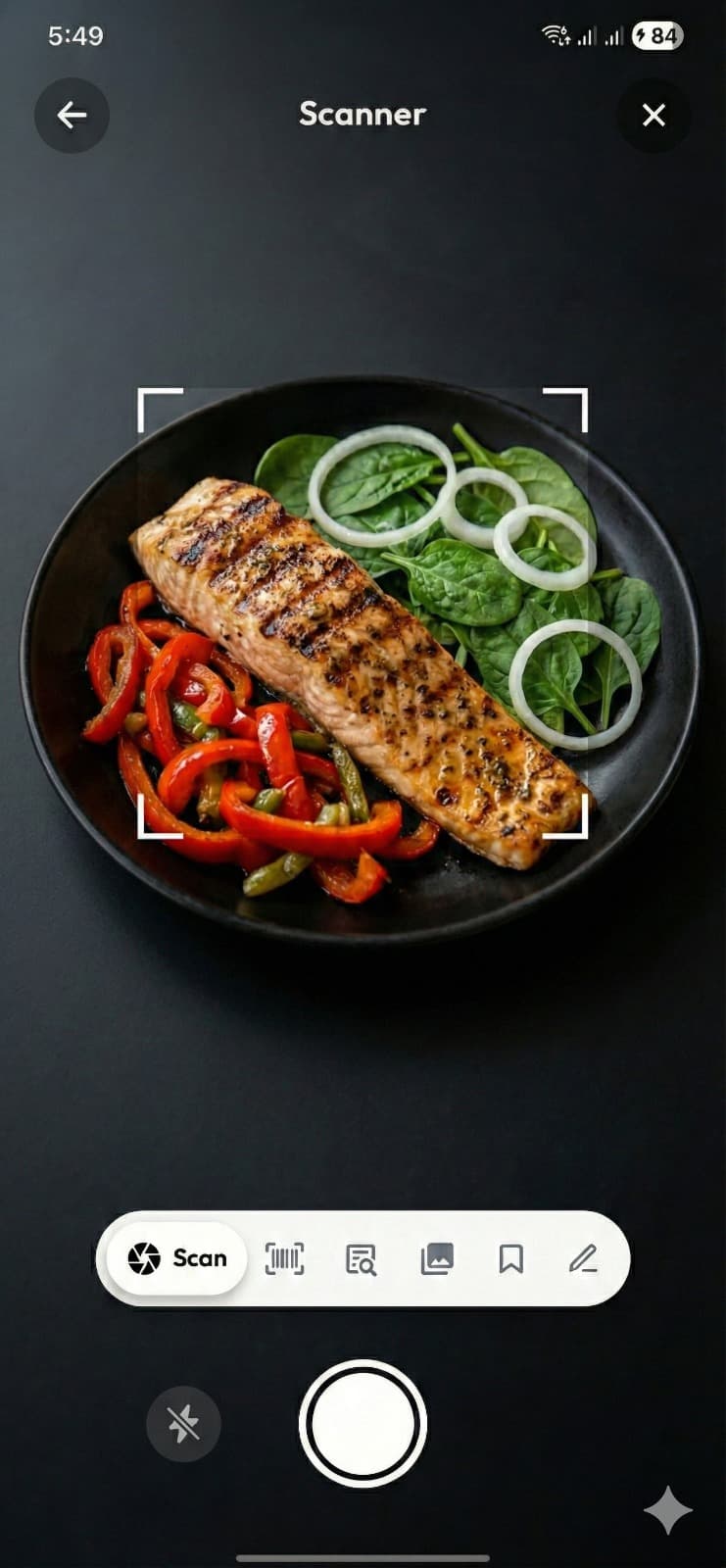
The scanner view in Caloris, mid-analysis.
Photo, barcode or description — which to use
A food scanner is not one input method, it is three, and picking the right one is most of the accuracy battle.
| Method | Best for | Accuracy | Typical time |
|---|---|---|---|
| Photo scan | Home cooking, restaurant plates, loose produce, anything unpackaged | Estimate with confidence score | ~3 seconds |
| Barcode scan | Packaged and branded products with a printed barcode | Exact label values | ~2 seconds |
| Text description | When photographing is impractical — a meeting, a dark restaurant | Estimate from the description you give | ~10 seconds |
The rule is simple: if it has a barcode, scan the barcode. Caloris reads packaged products against the OpenFoodFacts database, which returns the manufacturer’s own per-serving and per-100g figures. There is no reason to make a model guess at a number that is printed on the side of the box.
Six habits that improve every scan
- Shoot at about 45 degrees. Overhead photos remove the depth information the scanner needs to judge volume, so a thin layer and a deep bowl look identical.
- Keep something known in frame. A fork, a hand or a standard dinner plate gives the model a scale reference.
- Use even light. Harsh shadows and strong colour casts change how food looks to a classifier. Daylight or plain indoor lighting beats a phone flash.
- Capture before the first bite. Partial plates are a leading cause of bad portion estimates.
- Separate what you can. Two quick scans of a plate with distinct components will often beat one scan of a pile.
- Add the fat you know about. Absorbed oil, butter and dressing are invisible to a camera and routinely account for 100–300 calories a meal.
What the scanner cannot see
Being honest about the limits is what makes the tool usable. A camera cannot detect fat absorbed during frying, sugar dissolved into a sauce, cream stirred into a soup, or what is underneath the top layer of a mixed dish. It also cannot tell a full-fat product from a reduced one when they look identical.
That is exactly why every Caloris scan carries a confidence score, and why the entry is editable before you save it. A scanner that presents a guess as a fact is worse than one that tells you when it is unsure. For the full picture of where the underlying technology succeeds and fails, read the AI calorie counter guide.
After you scan
Scanning gives you intake. To make that useful you need a target to compare it against: the calorie calculator sets your daily number and the macro calculator splits it into protein, carbs and fat. If you would rather have the meals planned for you in the first place, the AI meal planner builds a day around the target.
Frequently asked questions
How do I scan food for calories?
Open a food scanner app, point the camera at your meal, and take a photo before you start eating. The app identifies each food, estimates the portion size, and returns calories along with protein, carbohydrate and fat. Review what it found, correct anything wrong, then save it to your diary. With Caloris the whole sequence takes about three seconds.
Can a phone camera really tell how many calories are in food?
It cannot measure calories directly — no camera can. What it does is recognise what the food is, estimate how much of it there is, and look up the nutrition values for that food and quantity. The result is an informed estimate rather than a measurement, which is why good scanners show a confidence score and let you correct the entry.
What is the difference between an AI food scanner and a barcode scanner?
A barcode scanner reads a product code and returns the manufacturer's own label data, so it is exact for packaged food. An AI food scanner uses image recognition to identify food that has no barcode — home cooking, restaurant plates, loose produce. Use the barcode whenever one exists, and the camera when one does not. Caloris includes both.
Does the AI food scanner work offline?
No. Photo analysis runs on a model in the cloud, so scanning needs a connection. Reviewing your diary, checking daily totals and re-logging foods you have saved before all work with limited connectivity.
How do I get the most accurate scan?
Photograph the meal at about a 45-degree angle rather than directly overhead so the scanner can judge depth, keep a familiar object such as a fork or hand in the frame for scale, use even lighting without harsh shadows, capture the plate before eating, and manually add any oil, butter or dressing you know was used but cannot be seen.
Can it scan food from a restaurant menu photo or a package?
The scanner is designed for photographs of actual food. For packaged items, scan the barcode instead — it returns exact label values. For restaurant meals, photograph the plate as served rather than the menu, since portion sizes vary far more than dish names suggest.
What foods does the AI food scanner struggle with?
Mixed one-pot dishes where ingredients are not visually separable, such as curries, stews and casseroles; anything where fat has been absorbed during cooking; drinks in opaque containers; and very unusual regional dishes that are thinly represented in training data. For these, correcting the entry or logging the main ingredients separately gives a better result.
Scan your next meal in three seconds
Caloris includes both the AI food scanner and a barcode scanner, free on Google Play. Photograph the plate, check the result, save.
- Free to download
- Photo, barcode or text logging
- No credit card to start

10,000+ downloads · Rated for 3+
Keep reading
- AI Calorie CounterHow AI calorie counting works, and how accurate it is.
- AI Meal PlannerGenerate a calorie- and macro-matched meal plan.
- For Weight LossSet a calorie deficit and track it without the busywork.
- Cal AI AlternativeA free Cal AI alternative for Android.
- Calorie CalculatorHow many calories should you eat per day?
- How to Count CaloriesA practical beginner's guide that actually sticks.